

Cute Laptop Sleeves That Are Actually Protective
TL;DR
- Most cute laptop sleeves are fashion product first and padding second. The good ones do both.
- Neoprene plus a foam layer is the standard for real drop protection. Anything thinner is just a dust cover.
- Measure your laptop before you buy. A 13 inch sleeve for a 13.6 inch MacBook is a bad day waiting to happen.
- Zipper quality is the first thing that fails. Cheap sleeves snag by month two.
A $1200 laptop in a $6 dust bag is a bet you are going to lose. The good cute laptop sleeves are the ones where the padding is real, the zipper does not snag, and the print on the outside is the tiebreaker instead of the whole sales pitch.
Padding is the whole product
Most cute laptop sleeves on Amazon are cosmetic. They are a printed fabric pouch with a thin foam lining that will save your laptop from scratches in a clean backpack and nothing else. If you want real drop protection you need a sleeve with at least 5mm of padding, ideally 8mm, usually from neoprene plus a foam or cork layer.
The tell is whether the product page mentions padding thickness, shock absorption, or a drop rating. If it only talks about the print and the color, it is decoration-first. Not automatically bad, just not really a sleeve.
When a cute laptop sleeve arrives, pinch the corner between your fingers. If you can easily feel the laptop shape through the fabric, the padding is a joke. Good sleeves have enough cushion that you can not tell the laptop edges are right there.
Measure twice — sizes are a mess
Laptop sleeve sizing is a minefield because laptop sizes are inconsistent. A 13 inch sleeve built for a 2018 MacBook will be too tight for a 13.6 inch M2 MacBook Air. A 14 inch sleeve labeled for a MacBook Pro 14 might not fit a ThinkPad 14. Always check interior dimensions in inches, not just the headline size.
Common laptop sleeve sizes
| Sleeve size | Fits (rough guide) | Interior dimensions |
|---|---|---|
| 11-12 inch | iPad Pro 12.9, small Chromebooks | ~12 x 9 in |
| 13 inch | Older 13 MacBook Air, MacBook Pro 13 | ~13 x 9.5 in |
| 13.6-14 inch | M2/M3 MacBook Air, MacBook Pro 14 | ~13.3 x 9.7 in |
| 15-16 inch | MacBook Pro 16, XPS 15, gaming laptops | ~15.5 x 11 in |
Neoprene, canvas, felt — which wins
Neoprene is the standard for a reason — it absorbs shock and resists water. Canvas looks cuter and feels more personal, but pads worse unless the sleeve has a separate foam layer inside. Felt is the budget aesthetic option and is basically decoration-only unless there is foam underneath. Cork-lined sleeves are the premium pick and cost accordingly.
Cute laptop sleeves from our gallery
Padded options in the price range where cute and functional actually meet.

Mochi Squishy Toys, 24 pcs Fruit Squishy Party Favors for Kids Classroom Prize Stress Relief Squishies Bulk Gift for Birthday Pinata Goodie Bag Filler Christmas Stocking Stuffers Easter Valentines

TeeTurtle - The Original Reversible Octopus Plushie - Happy + Angry Snowflakes - Cute Sensory Fidget Stuffed Animals That Show Your Mood - 4 inch, 1 count

suddus Curtain Lights for Bedroom, 90 Led Hanging String Light Outdoor, Fairy Curtain Lights Indoor for Christmas, Dorm, Wall, Backdrop, Window, Wedding, Party, Birthday Decor, Warm White

TeeTurtle - The Original Reversible Turtle Plushie - Cute Sensory Fidget Stuffed Animals That Show Your Mood- Lemons + Flowers

Stickers for Water Bottles, 200 Pack/PCS Cute Vsco Vinyl Aesthetic Waterproof Stickers Laptop Hydroflask Skateboard Computer Stickers for Teens Kids Girls

Gaiatop Mini Portable Fan, Small and Powerful, Cute Design 3 Speed Personal Handheld fan and Desktop with Base, Lightweight USB Rechargeable for Travel Lash Makeup Girl Women Summer Gift Black
Pick your sleeve budget
Cute laptop sleeves have a wider price range than most accessories because you are paying for both protection and style. The cheap ones are fabric bags. The midrange ones are real protection with a fashion tilt. The splurge ones are leather, cork, or designer collabs. Know what you actually need before you scroll.
Pick your laptop sleeve budget
Three honest tiers and what each one actually gets you.
Printed canvas or felt with minimal padding. Fine as a dust cover inside a padded backpack. Don't throw this on its own into a tote bag.

100pcs Kawaii Chiikawa Stickers Pack Japanese Cartoon Vinyl Stickers Funny Trendy Waterproof Decals for Teens Water Bottle Phone Journal Guitar Skateboard
TeeTurtle - The Original Reversible Octopus Plushie - Happy + Angry Snowflakes - Cute Sensory Fidget Stuffed Animals That Show Your Mood - 4 inch, 1 count
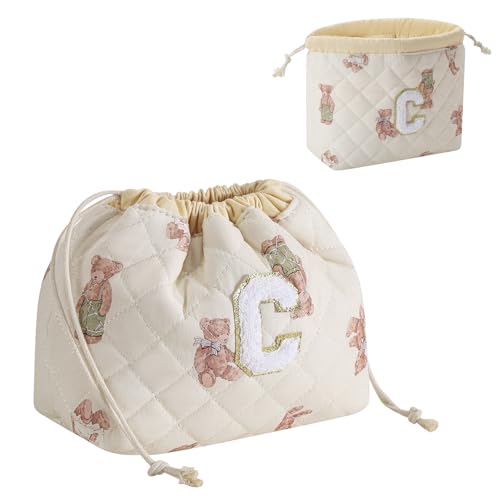
RSRSLEII Initial A-Z Quilted Cotton Drawstring Makeup Bag, Monogrammed Birthday Gift for Women Girls,Aesthetic Personalized Chenille Letter Travel Cosmetic Pouch with Bear Pattern(C)
The zipper is the first thing to fail
Nobody thinks about zippers until their sleeve snags and rips a laptop sticker off. Cheap YKK-knockoff zippers catch on the edge of the sleeve fabric, pull threads loose, and eventually jam. Real YKK zippers are worth an extra $5 and usually what separates a year-long sleeve from a 3-month one.
Some aesthetic sleeves use a magnetic flap instead of a zipper. These do not fully close — anything you drop in the same bag can slip past the flap and hit the laptop. Zipper-only unless your laptop lives on a shelf.
With a pocket or without?
An external pocket adds maybe $5 to the price and doubles the usefulness. A charger, a notebook, a small card wallet — all fit in a well-designed external pocket. The tradeoff is slightly more bulk. For commuting it is worth it; for clean table-to-bag transfers at home, a sleeker no-pocket sleeve wins.
Mochi Squishy Toys, 24 pcs Fruit Squishy Party Favors for Kids Classroom Prize Stress Relief Squishies Bulk Gift for Birthday Pinata Goodie Bag Filler Christmas Stocking Stuffers Easter Valentines
A neoprene sleeve with real padding and a print that holds up past the first laundry cycle — the kind you can actually trust with your laptop.
The working rule for laptop sleeves
Real padding, right size, real zipper, and a print you can live with for two years. That's the whole checklist. Cute laptop sleeves get bad only when you let the fashion pitch talk you out of checking the specs — and checking the specs takes 30 seconds.
Quick questions
At least 5mm of padding, ideally 8mm, with a shock-absorbing layer like neoprene or memory foam. Thinner sleeves are really just dust bags — they protect the screen from scratches in your backpack but not from drops. If the product page does not mention padding thickness or drop rating, assume it is the dust-bag kind.
If your backpack has a dedicated padded laptop section, a sleeve is optional for daily commute. If you throw your laptop into a tote or a plain bag, the sleeve becomes mandatory — it adds the padding your bag is not providing. Cute sleeves also double as a grab-and-go option when you do not want to bring a whole bag.
Usually no. The 13.6 inch M2 and M3 MacBook Airs are slightly bigger than older 13 inch MacBooks, and many 13 inch sleeves are cut for the older size. Check the listed interior dimensions, not just the headline size. A sleeve that is too tight stresses the zipper and warps the laptop edges over time.
Depends on the character and the style of the print. A minimalist line-art print of a mushroom or a small cat on an otherwise clean sleeve is still cute. A busy all-over print of a licensed character feels a lot more teen than adult. For a work context, subtle wins. For your home office or a café, loud is fine.
Still scrolling? Let us do the picking.
We built an Instagram-style swipe deck of every cute thing in our gallery. Swipe right on the ones you love — it's faster than reading reviews.